My Entry for Teamstudio’s Spotlight Award

Teamstudio recently had a contest where they wanted you to showcase your applications so that others can see what folks are doing out there and so you could toot your own horn a bit.

My entry was probably a lot less snazzy than the ultimate winners (I haven’t seen them) as I tend to focus on non-public facing utilities and infrastructure improvements in my development work.

But I thought it would be worthwhile posting my entry here (now that they’ve let me know I *didn’t* win… *sniff*) so those of you who know me might get some idea what I spend part of my days doing.

I just call my application the “Admin Agent Repository”. It was originally created to house a single major utility and to serve as a common repository for the myriad agents that are useful for administrators on a day-to-day basis. But I have refined it to allow non-developer administrators access to its functionality.
The most visible application was to buffer us from the rather absolute and immediate nature of Domino’s user termination where the need to reinstate caused a lot of headaches.
A document is created for each terminated employee – this can be created by anybody granted the correct role so security or helpdesk folks can input terms directly – and, on the appointed date the user’s name is submitted to the deny access group.
The app also verifies whether or not the user has a Blackberry device and notifies our Blackberry group to remove their account.

Designed when background agents could not access databases on other servers, the application will then run an agent on the user’s home server and, if necessary, update their database ACL with the name of a person responsible for cleaning up the mail file and send a note, with a link to that responsible individual explaining their responsibilities.
When the purge date arrives (the default is 4 days, 30 if a responsible person is defined,  all controlled via profile), the actual signed adminp request is submitted and the process proceeds as per Domino normal.
Reinstate is often as simple as putting the termination document on hold and removing the user from the deny group. No ACL updates, no repopulating in groups.
The repository is replete with utilities that I have found useful over the years, most are profile driven:

For instance the below profile drives our dynamically created groups. Each morning a subset of our groups are destroyed and recreated based on person document information input by either the users or our identity management system. The groups are used both to control application access based on certain criteria (i.e. all reports to a person can have access to a calendar app used by that team) or for communications (i.e. message to be sent to all folks within a particular state or management structure).

This one inspects all mail files and ensures that they not only have a template, but that it’s one of the standard ones that we mandate:

One ad-hoc utility that is quite popular is one that runs, inspects all of the calendar documents in a mail file and ensures that the $Busyname matches the Owner name from the calendar profile. Very handy for botched renames and transfers of mail files from other domains.
I also have a couple of “Rebuild Busytime” agents for clustered and non-clustered servers that run weekly to keep things there tip-top as well.
These utilities save us literally hours each week, any job that’s wasting my time I invest the effort into automating it and add it to this growing application.

Linksys PLE200 (PLK200??) Powerline Ethernet Adapter and wireless mouse?

After the disaster that was the Netgear Powerline Ethernet Adapters I was trepidatious about the technology. But, when I returned the Netgear adapters I went ahead and picked up the (much more expensive) Linksys PLK200 powerline adapters. Hmm… the box (and price) say PLK200 but the adapters themselves indicate that they are PLE200…

*sigh* looks like another trip back to Fry’s.

But the adapters still work really well. Trying Speakeasy’s test gets me 4-5 Mbytes throughput which is miles ahead of the Netgear adapters. Even letting them sit overnight (to get nice and hot) they didn’t get NEARLY as warm as the Netgear units. After I threw a Linksys 5 port switch onto them the throughput was still fine. So I’ve managed to network most of my new media center to the web. Even watched part of a “Coupling” episode via Netflix’s streaming technology.

Coincidentally, my wireless mouse has not been a happy camper for the past couple of days. It tracks along just fine but left-clicking (and even right-clicking) is just not… definite. Sometimes the click works sometimes not. I replaced the batteries a week or so ago and the mouse dialog indicates that battery and signal are fine so…  I swapped out my own wireless mouse for Michelle’s USB wireless mouse to see if it was to do with my mouse itself.  Nope, it does exactly the same thing.

Then, to make sure it’s not the computer running amok I grabbed the usb wired mouse from my server in the back room and… it works perfectly.

The only thing I can think that would generate EM radiation that might affect my wireless mouse seems to be these new powerline adapters. I unplugged the one closest to my mouse and it didn’t help at all but I realized a few minutes ago that I probably needed to remove both to be absolutely sure.

You don’t suppose it could be my Linksys 5 port switch?

Netgear HDXB101 Powerline HD Ethernet Adapter

I’ve picked up some new media pieces (more on those later) and need to get some Internet connectivity in my TV room.

As I see it the simplest thing to do was to run some Cat 5 cable from my kitchen (where my modem/router is) to the TV room. When I was browsing in Fry’s at lunch today I saw that they had some wireless Ethernet adapters that operate through your electical wiring. I quickly checked cnet.com for some reviews and found a bunch of fairly old reviews that indicated that they might not be too bad. The boxes were promising me throughput of up to 200 Mbps which is pretty impressive.

So I picked up some Netgear HDXB101 Powerline HD Ethernet adapters, picked up a couple of Linksys 5 port switches and brought them home to try out.

Fresh out of the car, so they were still nice and cool, I plugged them both in in my kitchen to test them before moving one of them down the hall. Using my laptop I used Speakeasy’s speed test as a fair sample of the kind of through-the-network-and-out-to-the-world use that I would need. From a direct hookup to my router I get a hair under 6 Mbps down and around 400 kbps up.

Using the (cold) Netgear adapters I was sitting at about 2 Mbps down. Not quite the 200 touted on the box but almost livable for what’s needed in that room. So I moved one of the adapters to the TV room and got similar results. Cool, that works for me.

I then broke out one of the switches to test and hooked it up too. First I tested the laptop directly off the switch and got my usual direct connection speed.

I ran the line from the router to the switch to the netgear adapter. Went to test the speed in the TV room and… almost zero throughput. When the test eventually began chugging along it wheezed out something in the low hundreds of kbps.

Many permutations of things were tried, leaving the switch attached to the router while running another line directly from the router, disconnecting the switch from the router entirely, no improvement. Nada.

I even went back to my original kitchen tests and brought myself up to about 730 kpbs down fairly consistently.

Feeling the Netgear boxes they were both quite warm. All I can think is that the electronics in them gets too hot and then degrades their performance?

They’re going back to the store tomorrow, I think I’ll try the ($50 more expensive) Linksys units and see what happens.

I originally didn’t want to use wi-fi since I’ve always found it to be pretty dismal performance wise. But even my laptop can pull down 4 Mbps in the TV room which is stellar compared to the absolute best the powerline adapters could manage. And both those are far short of the touted 200 Mbps…

In my opinion, both the wireless and the Netgear’s performance should still yield pretty close to the 6 Mbps that I can get when using a wired direct connection to my modem/router. The bottleneck *should* be my Internet connectivity (6 Mbps) when you think that even a wireless 802.11b connection should be able to manage 11 Mbps.

ReliOn Automatic Blood Pressure Monitor

Whenever I’m in a store and I see one of those blood pressure monitoring stations I’m drawn to it like a moth to a light bulb.

It’s like a video game only the results actually matter.

I often take the reading over a shirt and am surprised that the gadget gives me any reading at all.

Recently I got a reading that was a bit higher than I thought it should be and I thought that I should really just get one of my own that can give me an accurate reading whenever I choose.

Those of you who know me know I love my salt (best salt you can get is from Wendy’s BTW. Those little salt packets you get with take-away meals is really finely ground – sticks to your food better). And I’m often asked if I have high blood pressure as a result. Never fear, for most of my life my blood pressure been classed as “Low Normal” and that’s partly why I want to keep an eye on it.

Anyway, I went to the Consumer Reports website (I maintain on online subscription so I can check things out before buying them) and found that the ReliOn Model HEM-741CREL, available at Walmart for about $40, is one of CR’s best buys at about half the cost of the other recommended models. It was out of stock on Walmart’s website but there was one, albeit in a slightly crunched up box, available at a local Walmart when we were there picking up some groceries.

It remembers the last 30 blood pressure readings for two people and can run on batteries or an AC adapter. I put in batteries to retain the reading memory so I can get an average over time for myself.

It comes with a “regular adult” cuff which I wasn’t sure would be adequate for me so I also picked up (for $10 extra) the large size cuff as there was only one of those left as well. It turns out that the regular cuff was just fine for both Michelle and I. So I’ll be returning the larger one.

Anyway, I tried it out and the results seem appropriate for me. I think I need to try this out on some other folks to make sure that the results are accurate for them as well.

Consistently my results 108/66 to 115/69 with a heart rate hovering around 50 – 52 bpm. Guess I need more salt, eh? 🙂

My Personal Planetarium


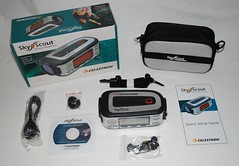
Back at the end of September, I splurged and picked up a Celestron SkyScout Personal Planetarium through Amazon.

This gadget is amazing! Once its GPS acquires your position it can either direct you to pretty much any celestial body you are interested in or you can point it at anything you see in the sky and it will tell you what it is and provide you with all manner of interesting info about it such as magnitude, composition, distance even lore concerning the object. For many items you can even listen to the description through the provided ear buds.

I had an initial issue where the unit simply would not acquire the satellites necessary to allow for a GPS fix. But updating the unit’s firmware (with the tool on the included CD) corrected this issue and allowed for rapid GPS position acquisition from then on.

My Personal PlanetariumAt left is everything you get in the box.

Note that this is not a magnifying tool. The lens on it is strictly for directing you to an object (via little arrows around the circumference of the lens) or to allow you to center an object and then press the “Identify” button.

I’ve been using this lately with a pair of Canon 15×50 IS Binoculars that I picked up a few years ago and the two make a terrific team.

The light pollution in my area is such that even the major constellations always seem to be incomplete and I tend to have trouble identifying what should be relatively simple objects. I have used various PDA-based star charts and they’ve been moderately successful in guiding me. But personal planetarium is like having a seasoned astronomy veteran next to you pointing the way to the objects you’re interested in observing.

It even has a “tonight’s highlights” feature to help you get rolling.

I’m hoping to try my hand at a “Messier Marathon” in the next couple of weeks.

Email to “The Skeptic’s Guide to The Universe” – FMRI

I haven’t had a chance to try to figure this out myself, but I recently posed the following question to “The Skeptic’s Guide to The Universe” to see if they could enlighten me.

The item they were discussing was the announcement that scientists could now, for all intents and purposes, image things that were viewed by test subjects using FMRI (Functional Magnetic Resonance Imaging).

Hi Guys (and Gal),

There is not much that I can say that hasn’t been said already about your awesome efforts in, not only maintaining a weekly schedule for this podcast, but also in constantly keeping it fresh and interesting. But I’ll add my voice to the many others who appreciate it and look forward to the fruits of your labor each week!

My question is regarding FMRI. Steve was emphasizing the fact that what you’re viewing is actually just blood flow and from that you infer greater or lesser brain activity in certain brain regions. What actually drives the change in blood flow? Neurons consume oxygen and glucose and release carbon dioxide and waste products, does the presence of the waste products (or the lack of presence of the fuels) cause the arteries to dilate? Or is the parasympathetic nervous system somehow in lockstep with the brain’s neurons and controlling arterial volume in response to, say, neuronal activity?
From my rather fuzzy perspective it seems that FMRI may actually be two rather than one inference away from the actual brain activity and, as such, would be a pretty crude approach to determining what is actually happening in there.

Is there any promising research that you know of that could allow direct detection of actual brain activity at the neuron level (i.e. detect adp/atp ratios or detect electrical activity at the cellular level)?

Looking forward to your insights,

Marc

Visit me at http://marc-bourassa.com

“It is easier to have a strong opinion when you lack information.”
– Michael Crichton

Kill A Watt EZ P4460 – Entertainment Center

Home Entertainment center As I mentioned before, my 12 year old TV consumes far less power than I expected. My whole system is rather dated. I was originally going to replace my TV on a 10 year horizon but the widescreen/flatpanel TV market was in such a state of flux a couple of years ago that I decided to wait it out a bit until LCD technology was a bit more mature and the whole widescreen thing was more mainstream and affordable.

I’d say that the past month and a half had fairly typical viewing by Michelle and I. We were out of the country for a few days. We’ve begun using Netflix so our DVD viewing is up a bit. But ups and down on viewing are just a normal part of life.

My total system is as follows:

  • Hitachi 50FX19K rear projection TV
  • Panasonic DVD-RP62 DVD player
  • Hitachi FX-613 VHS VCR
  • Phillips DSR708 Tivo

All of this is plugged into an APC BACK UPS ES 725 that keeps everything on an even keel even with Georgia’s terrible electrical power management.

The VCR, while admittedly not exactly the hotspot of the entertainment system was used to watch at least one full length movie while monitoring the energy consumption.

RESULTS

Elapsed time: 1083 hrs (about 45 days)
Measured Minimum Consumption (Watts): 52
Measured Maximum Consumption (Watts): 200
Measured Consumption (Amps): ? <–Sorry forgot to note this.
KWH: 76
Cost –
     Actual (for duration of test): $8.05
     Daily: $0.17
     Weekly: $1.24
     Monthly: $5.34
     Annual: $65.00

Winmail.dat file issue in Lotus Notes workaround (finally)

Lotus Notes LogoFrom the timestamps I see that this gem has been available since June of 2006 but I certainly had not heard about it.

Microsoft (M$), always there with useful products, also always manages to make things *just* different enough from standard that you can’t really seem to call them on it but they make it impossible to cleanly interface with their products as a competitor.

Case in point is Outlook and Exchange. If you create a message using M$’s email client and send it out the door using their Rich Text Format which seems to be of a proprietary nature, the message that arrives at the other end will be wrapped up in a file called “Winmail.Dat”.

For Lotus Notes this has always been a problem since the Domino server does not have the ability to unravel this proprietary formatting and so the recipient ends up with a useless (winmail.dat )attachment.

I know that there have been some fairly sophisticated attempts at providing solutions but the recipients of these messages are often business users with better things to do than try to master the arcane world of command line utilities with multistep processes.

Until now all we could really tell our users was to contact the sender and have them re-send the message but ensuring that they send with “Plain Text” instead of “RTF”. This is understandably awkward for a business user trying to look professional and it wasn’t doing my ego any wonders either.

The only really practical solution, besides Lotus actually dealing with the issue and including it in their SMTP router is this one presented to me by a co-worker (thanks Anton!). Created by Julian Robichaux (as far as I can tell as his name is all over the database) it is a simple mail-in database that you set up in your Domino environment. Your internal (and external if you wish to help out the rest of the world) Users then forward these nuisance messages to it and it replies back with the “unraveled” files.

So again the link is to Project WinmailExtractor. I had it set up and running in about 15 minutes including inspecting the code for any weirdness.

TCP APN for Verizon Blackberry 8830’s

It took me a while to figure this out so I’m documenting this mostly for myself but if it helps anybody else then that’s icing on the cake!

In a few words, don’t touch, save, change or in any way alter the contents of these fields!  Ever.

The following applies if you have a Blackberry communicating with a BES (Blackberry Enterprise Server). I cannot say if this will work for folks outside the corporate sphere but I see no reason why not.

Verizon support is clueless about TCP APN settings. Basically, if someone is using an application that doesn’t work and the solution is to update the APN, what you *really* need to do is:

  • Use desktop manager to backup the device
  • Wipe the device (you should be able to retain 3rd party apps if it asks)
  • Restore the device and turn on the radio <– it should automatically Activate itself – no need for Enterprise Activation.

Excerpt from the Crackberry forums posted by CrackBerry Genius:

!!!WARNING!!!

If you messed with your APN settings on a VZW8830 by putting something in, even if you clear it out and save it’s still messed up. If you’ve done this programs like BBWeather and Opera Mini WILL NOT WORK.

You must do an OS reload or possibly just a Wipe on the handheld to get this fixed. I personally did an OS reload to fix it, but never tried to do just a Wipe from the Security/General menu to see if that was sufficient.

I performed the above operation and got BBWeather to work just fine. I was having a similar problem with Jott for Blackberry but since then they’ve made that app a paid-only service and the price is much steeper than the value that I feel I’d get from it (but I’d love to try it again to see if it works at all).

Kill A Watt EZ P4460 – Hitachi Rear Projection TV 50FX19K – Standby Mode

Another surprise here. Ishwar suggested putting the Kill A Watt on my TV to see what the power consumption is like when it’s just sitting there waiting for me to turn it on. From what we’ve both heard I had rather expected the TV to consume a fair bit of power in this mode. At least that’s why we’re supposed to unplug such appliances when not in use (yeah, like that’s going to happen).

As it was the TV consumes so little power that it doesn’t even register on my power meter. In fact, after nearly a day (21 hrs) it still had not consumed enough to register any value at all.

Either my 12 year old rear projection TV set is extraordinarily energy efficient or those energy saver guides are using “common sense” rather than actual empirical evidence when they offer this advice…

Anyway, I’ve hooked up my entire entertainment system to check out what a week or so of consumption is like. Coming up soon.