
 I just picked this up and was surprised that I couldn’t find a PDF of the instruction manual. All the SevilleClassics website has is the QuickStart card.
Click Here for the PDF Manual
I just picked this up and was surprised that I couldn’t find a PDF of the instruction manual. All the SevilleClassics website has is the QuickStart card.
Click Here for the PDF Manual
This was not obvious to me at all so I thought I would share it.
If you are finding your iAqualink unit is showing a temperature that is within 4 degrees higher or lower than your pool water actually is, you can go to Menu > System Setup > Temp Calibrate and get to a screen that looks like this one below.

I do not have a Spa so only the Pool is showing a valid temperature. The issue here is there is no obvious way to actually adjust the temperature and APPLY the change.
What you want to do is, with the pump running so the temperature is registering:
In about 15-20 seconds you should see the “Pool Temp” reading on the home screen adjust to the newly calibrated temperature.
This is completely counterintuitive since, to me, the “Back” button is equivalent to a “Cancel” key. “Take me out of here without changing anything”. It took over two months of going back and forth with Zodiac before I finally got a helpful person on their customer service line who could say something other than “You need to contact an authorized service company before we can do anything”.
Last year before I upgraded to OS X Yosemite I did a fair amount of research and figured out which programs would need to be upgraded and which would work just fine. I missed the fact that my wife uses a Chromebook and was depending upon my running Google Chrome on my Mac in order to print via Cloud Print.
This functionality, of course, broke in Yosemite and nobody can seem to be bothered to fix it. I assume that either powerhouse Apple or powerhouse Google could resolve the issue in an afternoon were they so inclined so I don’t know why they are being obstinate. But this is the world we live in so we need to adapt.
As a recent Mac convert there are still some Windows programs that I have not found replacements for. Despite Macs incredible popularity these days Windows software ported over to Mac seems feature deprived or non-existent. Case in point my financial software Quicken. I’m astonished that the offerings out there for Mac owners are so meager in this arena.
I use the excellent VMWare Fusion product to run Windows in a virtual machine on my Mac. This is practical because the Mac is relatively beefy and has the resources to support the VM with no compromise to any other Mac functionality.
My printer is shared with the VM (you know where this is going) so it’s just a matter of leaving Chrome running in the VM and, lo and behold, my wife can print all she wants to our Classic HP Laser printer.
I know it’s a bit of a cheat and I don’t expect you’ll want to set up a vm just to allow Google Cloud Print from OS X but for those of you already running some kind of non OS X vm who may not have already thought of doing this…
** Update September 23, 2014 ***
The conspiratorial side of my brain wants me to point out:
1) The Outage notifications on Comcast’s site ceased immediately after this blog post
2) My service has been.. spotty ever since, including a complete outage that lasted around an hour the following night….
Where my Download / Upload speeds were consistently 50/10, now I’m thrilled if my download is in the 20’s.
Just ran another check and can see that I’m sitting at 23.2/10.4.
Just saying’ . Not that the only available option of our local duopoly would *ever* stoop to vindictiveness… would they?
** End Update **
I had a recent dealing with Comcast that had me logging on to their site pretty much every day for almost two weeks at the end of August/beginning of September.
Something that started to bubble up in my consciousness was how many outages they were reporting in my area, none of which seemed to be affecting me.
I decided it would be an interesting exercise to, for one week, log into my account periodically throughout the day whenever I was working on my computer (which I do quite a bit) and check my status.
Of greatest interest to me was the fact that not once in all the times I logged in was there ever NOT an outage in my area.
I will concede that there was at least one day where I was impacted by some issue so these notifications are not 100% bogus. But the continuous nature of the notifications has me thinking what a great way this would be to keep folks from calling in if they *did* have a complaint. After all how often do you log into your Comcast account anyway? I know I certainly wouldn’t (haven’t) noticed the notifications during my monthly visit to capture my billing statement.
Below are the details of when I logged in and what the current outage situation was. You tell me – am I just having a spate of issues or is Comcast saving money by reducing customer service call volume?
| Date and Time | Outage Notification | |
| 9/10/14 9:41 PM | An outage has been reported in your area. We expect this to be resolved by 1 AM tomorrow. | |
| 9/11/14 10:00 AM | An outage has been reported in your area. We expect this to be resolved by 12 PM today. | |
| 9/11/14 1:02 PM | An outage has been reported in your area. We expect this to be resolved by 4 PM today. | |
| 9/11/14 4:36 PM | An outage has been reported in your area. We expect this to be resolved by 8 PM today. | |
| 9/11/14 7:25 PM | An outage has been reported in your area. We expect this to be resolved by 12 AM tomorrow. | |
| 9/12/14 7:52 AM | An outage has been reported in your area. We expect this to be resolved by 11 AM today. | |
| 9/12/14 1:56 PM | An outage has been reported in your area. We expect this to be resolved by 3PM today. | |
| 9/12/14 6:50 PM | An outage has been reported in your area. We expect this to be resolved by 11 PM today. | |
| 9/13/14 10:46 AM | An outage has been reported in your area. We expect this to be resolved by 2 PM today. | |
| 9/13/14 6:28 PM | An outage has been reported. We’re working to fully restore service as soon as possible. | |
| 9/14/14 12:15 AM | An outage has been reported in your area. We expect this to be resolved by 2 AM today. | |
| 9/14/14 11:51 AM | An outage has been reported in your area. We expect this to be resolved by 1 PM today. | |
| 9/14/14 1:12 PM | An outage has been reported in your area. We expect this to be resolved by 5 PM today. | |
| 9/14/14 4:33 PM | An outage has been reported in your area. We expect this to be resolved by 9 PM today. | |
| 9/14/14 11:27 PM | An outage has been reported in your area. We expect this to be resolved by 1 AM tomorrow. | |
| 9/15/14 7:56 AM | An outage has been reported in your area. We expect this to be resolved by 12 PM today. | |
| 9/15/14 7:07 PM | An outage has been reported in your area. We expect this to be resolved by 8 PM today. | |
| 9/15/14 8:13 PM | An outage has been reported in your area. We expect this to be resolved by 12 AM tomorrow. | |
| 9/16/14 7:41 AM | An outage has been reported in your area. We expect this to be resolved by 11 AM today. | |
| 9/17/14 7:55 AM | An outage has been reported in your area. We expect this to be resolved by 10 AM today. | |
| 9/17/14 12:02 PM | An outage has been reported in your area. We expect this to be resolved by 2 PM today. | |
| 9/17/14 6:13 PM | An outage has been reported in your area. We expect this to be resolved by 10 PM today. |
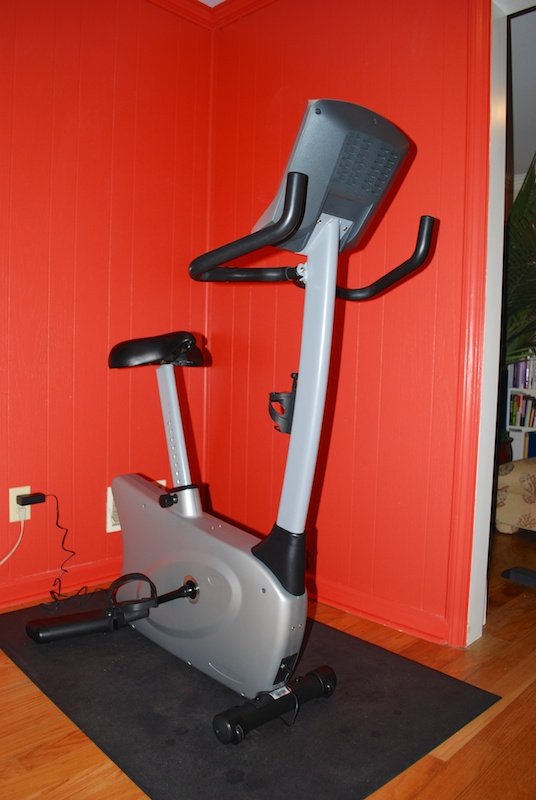 I purchased this exercise bike as a replacement for my Vision Fitness E3600HRT which I used for over 10 years before it died on me. My experience with the E3600HRT and with a Vision Fitness Treadmill that I own are what led me to consider the U20.
The U20, when I purchased it from Amazon, cost about $900. The E3600HRT cost about $1,400 in 2001 if that gives you any indication of the class of bicycles I am comparing.
This bike arrives in TWO packages (Amazon did not know this), one containing the frame and bulk of the machine, the other containing the console. The bicycle package weighed in around 70-80 pounds and was pretty beat up but was packed well enough that the only visible damage to the bike was that the sleeve where the seat post enters the frame had some plastic chipped off of it. Vision Fitness is VERY good at warranty replacement and had a replacement part at my home in about 3-4 days.
I made the rookie mistake of not actually test driving the bike before ordering it. These days “Spin Cycles” are all the rage and there are precious few showrooms where you can find an old school exercise bike such as this to try out. I had decided to trust my prior experience with the brand. LEARN FROM MY FAIL.
Some of the CONs below are from my own biases which emphasizes my point that all bikes are not for all people so a test ride, no matter how inconvenient, is required.
First the PROs:
Now the CONs:
I ended up returning the U20, the first two issues ultimately made the decision for me. I *could* have replaced the cranks with the old ones from my retired exercise bike. And I can probably find a suitable seat at my local bike shop. And I may have been able to shim the seat post to stabilize it. But for $900 and the fact that I intend to spend at least 10 years with this equipment, I want it to feel right coming out of the gate.
Don’t get me wrong, Vision Fitness is an excellent company and this bike may work very well for some folks, just not for me. Now I need to go test-drive some stationary bikes.


I sent this to HULU this morning:
I like Hulu’s offerings. But the ads have become an overwhelming issue for me.
It’s bad enough that I cannot get rid of them entirely even though I am willing to pay a premium to do so.But can you PLEASE do something about the repetitiveness of the ads? Last night there were 6 ad slots in the show I was watching and you aired the same series of ads in every slot.I can be persuaded to watch an entertaining or novel ad but once I’ve seen an ad I usually never need to see it again. Having the same ad foisted on me every 8-10 minutes is not only annoying it’s downright insulting. I am astonished that anybody deems this effective.There are plenty of viewing alternatives out there and, while HULU does a very good job at managing and delivering content, for me it is worth pursuing the other more cumbersome options to avoid this ongoing vexing issue.I do ask that you rethink your model – there must be an ad free alternative – even at a premium. It is literally a weight off of my shoulders when I watch programming on Netflix and don’t have those constant interruptions.Thanks for your consideration,Marc
Shortly before I received my notice from Comcast regarding their data capping scheme, I began experiencing intermittent issues accessing Netflix via my Apple TV and my iDevices… I naturally assumed it was Comcast doing something to filter and otherwise mess with a prime competitor to their own web services.
But after digging into it further I found that I could access Netflix just fine from my Mac computer. I could also access HULU from my Apple TV but Netflix was still a bust and so was trying to access anything through the Trailers app.
Resetting the Apple TV via a restart or unplugging it resulted in it taking an incredible amount of time for it to bring up the apps. You basically stare at the default “Computers” and “System” apps and nothing else for … I’m not sure how long – but definitely over a half hour where it should take mere moments for them to populate.
Other pieces of the constellation of symptoms soon started manifesting (or at least being recognized), I was having occasional glitches when using my web browser (Safari mostly these days) where a URL would populate in the address field and the progress bar would advance about a quarter of the way across the field and pause. Often just clicking on the field and hitting enter would get it to reload properly.
It turns out that there must be something going awry with OpenDNS. I went to my router and removed the OpenDNS IPs and restarted the router and allowed my provider to populate them and *poof* it appears all my symptoms have disappeared.
Of course the proof will be if the issues stay gone as to whether this is a permanent solution or just something that’s masking another issue that I have yet to stumble upon. But I wanted to post this in case there are any other folks with resolution issues who use OpenDNS.
This doesn’t guarantee that Comcast isn’t somehow messing with OpenDNS, but that’s probably a stretch. As much as I distrust Comcast I’m not sure how much benefit they would have in controlling their customer’s DNS resolution capabilities. And I’m still ticked that they are doing the metering thing so … anything is possible.
Immediately on the heels of Comcast notifying me that they want to cap my access we began experiencing issues accessing Netflix. We absolutely could not get it to work on Thursday and I couldn’t get it through Apple TV on Friday (although I was able to get it on another i-device and mirror it over to the Apple TV).
All yesterday and today I’ve been having odd issues where websites are delaying in loading or loading part way and then quitting on me. It doesn’t matter which computer is being used.
Comcast has actually been *over* delivering for the past few months with download and upload speeds just slightly greater than promised. I had thought that they had finally figured out how to make their customers happy or at least not feeling ripped off with every interaction.
Now all of a sudden I see that they realized the error of their ways. I suppose they were drifting away from the bottom of the customer service ratings and decided they needed to implement new strategies to get back down there?
I just received this email this morning. My plan was formerly unfettered. I note the spin placed on the data cap they are introducing.
I expect that if you choose to use their streaming service you’ll find the cap doesn’t apply to that data?
When I check my current usage, it tells me that “Note:enforcement of the 250GB data consumption threshold is currently suspended”
Which is it? 250 GB or 300GB?
Important information regarding your XFINITY® service. |
||
|
Dear XFINITY Internet Customer: At Comcast, we recognize that our customers use the Internet for different reasons and have unique data needs. Starting December 1, 2013, Comcast will trial a new monthly data plan in this area, which will increase the amount of data included in your XFINITY Internet Service to 300 GB and provide more choice and flexibility. What this means for You The vast majority of XFINITY customers use far less than 300 GB of data in a month. Based upon your recent usage history, it appears this new data plan will have no impact upon you, and you won’t need to do anything, or change your Internet usage. If you are not sure about your monthly data usage, please refer to the Track and Manage Your Usage section below. We want our customers to use the Internet for everything they want and your service will not be limited to 300 GB. While we believe that 300 GB is more than enough to meet the Internet usage needs of most customers, Comcast will automatically add blocks of 50 GB to your account for an additional $10, should you exceed the 300 GB included in your plan in a month. In order for our customers to get accustomed to this new data plan, we are implementing a three-month courtesy program. That means you will not be billed for the first three times you exceed 300 GB included in the data plan during a 12 month period. Should your usage exceed 300 GB a fourth time during any 12-month period, an additional 50 GB will automatically be allocated to your account and you will be billed $10 for that data and each additional 50 GB of data in excess of 300 GB during that month and any subsequent months your usage exceeds 300 GB. Please note that this is a consumer trial. Comcast may modify or discontinue this trial at any time. However, we will notify you in advance of any such change. For more information on all our data usage plans, please visit www.xfinity.com/datausageplan/ Track and Manage Your Usage Comcast provides you with several tools to easily track and manage your data plan:
If you have any additional questions about the new data usage plan, please visitwww.xfinity.com/datausageplan/ Thank you for being an XFINITY Internet Customer. Sincerely, Comcast |
The bobcat came in and regraded the backyard. That plus clearing out a bunch of the debris sets the stage for finessing the terraces.
It was too wet and sloppy today for me to want to trek up to the end of the yard for an overview shot but you’ll see in the next batch the difference.
The irrigation system piping is now buried except where final connections need to be made.

Looking closely you can see that the yard immediately behind the lenai is now level and there are two terraces taking shape beyond that to the left

The side yard is prepped. There will eventually be a fence and some nice space for the bird bath and a new bird feeder.

As viewed from the side of the above shed. It’s a bit hard to get a sense of the angles from this perspective.

